>
New Topic
>
Reply<
Esato Forum Index
>
Sony Ericsson / Sony >
Software, Firmware and Drivers
> K850/W910i Video Encoder
Bookmark topic
Thanks for that. worked a peach. I have another question for you boffins. I want to use a clip from Empire Strikes Back as the screen saver but my lovely w910i only lets me choose a picture from my photo album as it. I've tried putting the clip in the photo file but this hasn't worked. Any ideas?
Cheers in advance
[ This Message was edited by: babyboyg on 2007-11-11 20:15 ]
--
Posted: 2007-11-11 21:14:29
Edit :
Quote
babyboyg wrote:
I want to use a clip from Empire Strikes Back as the screen saver but my lovely w910i only lets me choose a picture from my photo album as it. I've tried putting the clip in the photo file but this hasn't worked. Any ideas?
Cheers in advance
hmm this is a bi of a tough one
so you want the clip as your screen saver
well this isnt possible the best thing i can suggest is convert the clip in into gif(animated picture file) this will work then
--
Posted: 2007-11-11 22:57:47
Edit :
Quote
Thanks, you know what question is coming next though...
How do I change it into a gif?
Thanks again in advance.
--
Posted: 2007-11-12 06:45:58
Edit :
Quote
well i dont have time now but this is on the quick so you can browse abit
http://www.tomshardware.com/forum/11250-49-good-free-converter
^suggestions on which avi to gif converter
http://www.brothersoft.com/downloads/movie-to-gif-converter.html
http://www.freedownloadmanage[....]vie_to_gif_converter_software/
two sites with links of some of them
i highly suggest reading the suggestions (first link) hopefully tomorrow with more time - or someone else on this forum - can help you find a free app
edit 1minute later

:
damn maybe im too quick
 http://www.softpedia.com/get/[....]-to-GIF-Converter-2-Beta.shtml
free one try it see how it works:)
[ This Message was edited by: DarkKrypt on 2007-11-12 07:11 ]
--
Posted: 2007-11-12 08:09:06
Edit :
Quote
question, I encoded a DVD with japanese audio, and I wanted the subs to be encoded as well.
So I added these, but when I play the movie with my K850i, the subs don't appear!...

any suggestions?
--
Posted: 2007-11-12 19:21:48
Edit :
Quote
CruSifiXken wrote:
question, I encoded a DVD with japanese audio, and I wanted the subs to be encoded as well.
So I added these, but when I play the movie with my K850i, the subs don't appear!...
any suggestions?
http://www.divxland.org/permanentsubtitling.php
^this is probably your best shot at embedding subs into videos permanently
http://forum.digital-digest.com/archive/index.php/t-832.html
http://answers.yahoo.com/question/index?qid=20060811182148AAxrPKg
http://forums.afterdawn.com/thread_view.cfm/453167
afterdawn is always good^
http://www.google.com/search?[....]embed+subtitles+to+movie+files
^googled it
hope this all helps especially the first link:)
later on just use any of the encoders i have suggested/added to this thread:)
[ This Message was edited by: DarkKrypt on 2007-11-12 22:09 ]
--
Posted: 2007-11-12 23:07:42
Edit :
Quote
ive been using for quite a while now...and i must say its the best ive used so far ! =D
http://www.download.com/Free-[....]2194_4-10498771.html?tag=lst-1
its a small program that converts AVI's to MP4.
easy to use, has never failed, AND ITS FREE
--
Posted: 2007-11-13 12:12:41
Edit :
Quote
@swordliger
thanks mate
ive tried it its good too:)
bumpy BUMP!
--
Posted: 2007-11-24 10:49:43
Edit :
Quote
Seems there is lot of video converters program .. M3 I have used was very easy..
Dunno how is the other is..
Darkcrypt
When you convert videos from XviD ,what quality and frams do u use??
--
Posted: 2007-11-24 13:10:21
Edit :
Quote
SilveR. wrote:
Seems there is lot of video converters program .. M3 I have used was very easy..
Dunno how is the other is..
Darkcrypt
When you convert videos from XviD ,what quality and frams do u use??
*DarkKrypt
from first page; just also read the bottom line it should be 256kbps not 325 - the pic was a mistake but the rest is fine:)
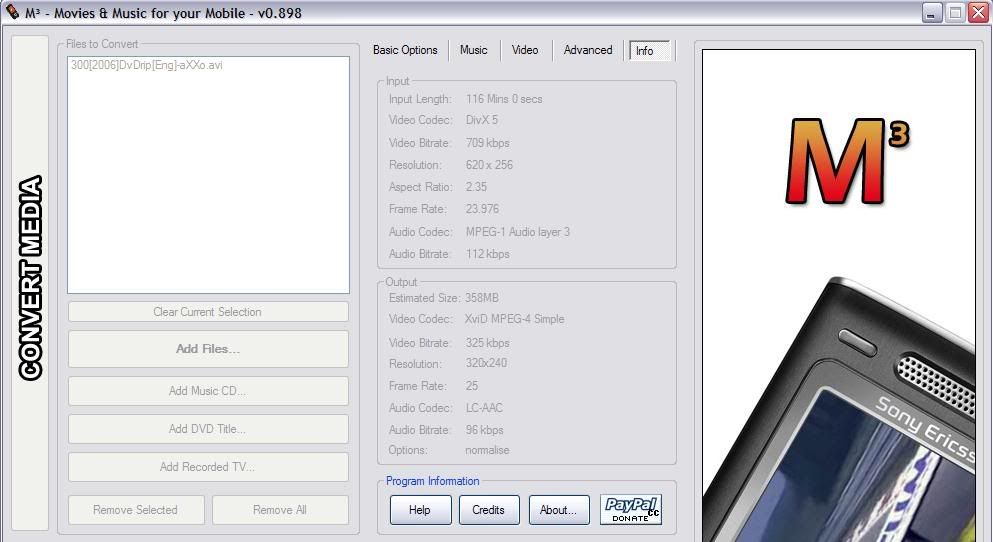
also the bitrate should be around 256kbps or so not 325 kbps..my bad
also the frame rate can be between 23 and 25 - 25 is optimal

[ This Message was edited by: DarkKrypt on 2007-11-25 08:33 ]
--
Posted: 2007-11-25 09:32:11
Edit :
Quote
New Topic
Reply
