>
New Topic
>
Reply<
Esato Forum Index
>
Regional >
Asia Pacific
> New OM server as of aug.15,2009
Bookmark topic
Jane, try this OM3.1, on your phone settings, make sure na my proxy, then ung server, teka, san nga ba, hehee
http://aquared29.110mb.com/Opera%20Mini%20moded%20v3.10.jar
edit:
OM3.1 server
http://wap.smart.com.ph/q/nph[....]2e3138392e3134322e36383a38302f[ This Message was edited by: litemint on 2009-08-18 04:28 ]
--
Posted: 2009-08-18 05:20:07
Edit :
Quote
@litemint
pde po ba om 3.1 sa nokia 6600?..
paturo namn po ng setup para mapagana om sa 6600
smart user po aq..
--
Posted: 2009-08-18 05:31:57
Edit :
Quote
@rhon
hi po, try ko po yan later, i hope this time, it works! I keep my fingers crossed! haha
@lite
am glad ur there to liven up my bad day..haha! Joke! Nways, di ko po madownload ung nasa link, downloading failed naman..bakit ganun? Wala nang magandang nangyayari sa akin..huhu
--
Posted: 2009-08-18 05:33:00
Edit :
Quote
@sir rh0n,i did that b4,way back t0 ph0enix trick..it didn't w0rk on my s40 f0ne..same err0r occured.as well as this new trick..i als0 tried t0 change p0rt int0 53 using phoenix trick jz t0 try if it'll g0nna w0rk,bt unfortunately it didn't..hehe..yet, the security err0r didn't appear..I think there's sumthing with the p0rt 80 f u use it on om2.06 s40 f0ne..hmmm...
@wonder girl,wat's ur f0ne unit?
--
Posted: 2009-08-18 05:36:03
Edit :
Quote
@jane and chatze - download OM3.1
here by Thor, OM2.1
here by datumama
Either way, you can set the proxy settings sa loob ng OM3.1 or 2.1.
eto short setup, once madownload nyo na ang OM2.1 or 3.1, press
#8 and click
Network
Under the Opera Mini Server textbox, put this:
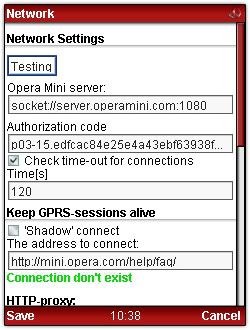
http://m.smart.com.ph/q/nph-index.cgi/000010A/687474703a2f2f38302e3233322e3131372e31303a38302f
http://m.smart.com.ph/q/nph-index.cgi/000010A/687474703a2f2f3139352e3138392e3134322e36383a38302f
sa ibabang settings,
Kung hindi maedit ang phone settings mo para lagyan ng Proxy at port.
under
HTTP proxy, sa
Additional, Check
HTTP, server:
myproxy.ca and port:
80
then save.
then proceed sa network setup.
Kung di umubra, eto pa ibang tricks,
OM server
http://wap.smart.com.ph/~carsteng/nph-via.cgi/000000A/http/195.189.142.69:80
Proxy: public.rz.fh-wolfenbuettel.de
Port: 80
Goodluck!
[ This Message was edited by: litemint on 2009-08-18 05:12 ]
--
Posted: 2009-08-18 05:49:38
Edit :
Quote
@bheng
s40v5 series 1680c to be very exact! Gusto mo palit tayo girl?haha
@lite
cge poh try ko yan dl courtesy of thor later..huh it's draining, masyado na akong harrassed ng mga om's na to!haha salamat a lot!
--
Posted: 2009-08-18 06:02:00
Edit :
Quote
Goodluck, balik ka nlng dito, take note mo lahat ng instructions, hihi
--
Posted: 2009-08-18 06:08:34
Edit :
Quote
@litemint
thanks for ur guidance, haha..i'll take it from u..wish me luck! I'll keep my fingers crossed! In the meantime, it's lunchtym here..kain po muna tayo!!haha
--
Posted: 2009-08-18 06:16:00
Edit :
Quote
@superlite, grabe tlga ang speed ng globe hndi q mpaliwanag, hndi q na maiwan.. Ang superbilis tlga nya superlite

ndi pa q gumagmit ng DNS, wha f kung ggmit pa q,panigurado lilipad na q sa bilis
hehe..
--
Posted: 2009-08-18 06:21:00
Edit :
Quote
paturo naman po.
nainstall na ung opera..gamit ung globe..
pag globe gamit ko gumagana ung opera 4.2
pag smart ayaw . .T_T
failed to connect daw..
di'nownload ko na yung proxy pang s40..at un ung gnmit ko.
ayaw padin
di ku lam nu ung mga gawin
nokia3110c fone po ko.. S40 na fone..
help..newbie lang me.. tnx..

--
Posted: 2009-08-18 14:05:39
Edit :
Quote
New Topic
Reply
