>
New Topic
>
Reply<
Esato Forum Index
>
Sony Ericsson / Sony >
Software, Firmware and Drivers
> K850/W910i Video Encoder
Bookmark topic
Hi pal! I tried it (M3) but it doesnt work on my comp. the setup and all is fine but theres a window that is all blank except for some Nero heading. And my system freezes. i have to then End Task to continue. any ideas?? All other stuff works gr8 n NO, my pc is not faulty! I have other converters up and runnig, but for this one. Pls help
--
Posted: 2007-11-26 18:04:34
Edit :
Quote
Darkcrypt.

ThX dude
--
Posted: 2007-11-27 01:43:22
Edit :
Quote
pixantz wrote:
Hi pal! I tried it (M3) but it doesnt work on my comp. the setup and all is fine but theres a window that is all blank except for some Nero heading. And my system freezes. i have to then End Task to continue. any ideas?? All other stuff works gr8 n NO, my pc is not faulty! I have other converters up and runnig, but for this one. Pls help
is your system vista or winxp as it seems it wont run on vista unless you setup some dll files/modules for it which i havent figured out yet(dont know where to get them either,yet!)i dont want to reinstall vista as it can shizzle up my system

also try restarting the system
worst case scenario is, use jet audio thats the next best thing(my second choice) or..
the one swordliger suggested(link below),this is my third choice in video encoding.
try my suggestions..and get back to me:)
@SilveR No problem mate
--
Posted: 2007-11-27 03:10:57
Edit :
Quote
I have a similar problem to the one stated earlier on in this thread. Basically I have a W910i and I've been trying to watch videos on it. The problem is that the video is considerably out of sync with the sound (to the point where the video looks like it's playing just a little bit faster than slow motion) The other problem is that I have a Mac and so the software recommended here is not available. Instead I've been using HandBrake. This has allowed me to rip from a dvd and to encode so that I can play movies on my w910i but even though I've used the same parameters stated on this thread (256 video bit-rate, 96 Audio bit-rate, ipod Low-Rez) the video and audio are still both out of sync. It's annoying because I feel like I'm so close to working this out. Any help would be much appreciated. Kur.
--
Posted: 2007-12-07 16:17:00
Edit :
Quote
Kurushi wrote:
The problem is that the video is considerably out of sync with the sound (to the point where the video looks like it's playing just a little bit faster than slow motion)
The other problem is that I have a Mac and so the software recommended here is not available. Instead I've been using HandBrake.
This has allowed me to rip from a dvd and to encode so that I can play movies on my w910i
but even though I've used the same parameters stated on this thread (256 video bit-rate, 96 Audio bit-rate, ipod Low-Rez) the video and audio are still both out of sync. It's annoying because I feel like I'm so close to working this out. Any help would be much appreciated. Kur.
DarkKrypt here:)
1.ok it looks like its something to do with your video output "video looks like it's playing just a little bit faster than slow motion" as is just a little bit faster then slow motion which is odd.
2. i recently checked out handbrake but havent had time to mention it (was helpin a friend with a mac convert vids - i told him try that^)
3.yep
also details here of what it can do and what it uses
http://handbrake.m0k.org/?article=details
if anyone is interested
4.320x240 is waht you use, what is ipod low-reso?, sounds jibbed lol.
another thing you can try is convert the dvd first to an avi, then into an mp4 using handbrake
Using the details link above, here i the output section.
Outputs:
* File format: MP4, MKV, AVI or OGM
* Video: MPEG-4 or H.264 (1 or 2 passes or constant quantizer/rate encoding)
* Audio: AAC, MP3, Vorbis or AC-3 pass-through (supports encoding of several audio tracks)
i want you to try
for video - mp4,320x240, 25fps
for audio - aac, 96kbps and both audio channels
http://i205.photobucket.com/albums/bb90/DarkKrypt/m3mysetup.jpg
also look carefully at the picture above..and use some of its details to help you (the output section)[also i made a mistake on the bitrate its not 325kbps its ment to be 256kbps - human mistake lol]
as you can see i used the movie 300 to do the conversion and thats it setup
--
Posted: 2007-12-08 08:37:33
Edit :
Quote
[ This Message was edited by: Kurushi on 2007-12-10 10:28 ]
--
Posted: 2007-12-10 01:24:52
Edit :
Quote
I've managed to get videos on my W910i to work using HandBrake where the sound and image are both in sync. The only problem appears to be that, for some reason, at the start of each video it takes a few seconds to reach synchronisation. Sometimes the image will speed up a little bit until the image and sound are both in sync and then return to normal, this happens maybe once or twice in an half hour episode of something and lasts only a several seconds. On an animated show the problem is slightly different as the image doesn't speed up but it is easily rectified by scrolling back a few seconds and for some reason the sound and image are back in sync.
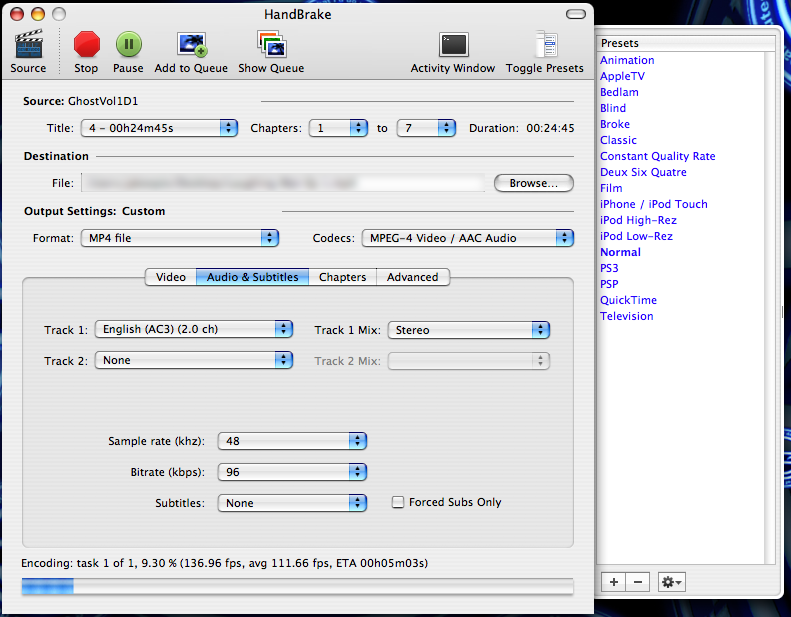
On the right hand side of the images below are the preset options. I recommend the 'i-pod low-rez'. It basically changes all the parameters and even though some will need to be changed back manually it does seem to change settings that are hidden away somewhere, so it's best to just click that first. After that I've changed the audio settings to what you can see and below are the video settings. (note that where it says "Output Settings: Custom" in bold this changes from 'Output Settings: i-pod low-rez' whenever you change a setting but when I tried only adjusting settings manually without having clicked 'i-pod low-rez' the encoding took about 5 minutes longer for the same video and so like I said the i-pod low-rez must do something else). I hope this helps anyone else with the same problem. It really seems like HandBrake is the best software to do this with for a Mac.
If you are interested the video here which lasts almost 25 minutes came out at only 60mb.
Kur,
Thanks for your help DarkKrypt
[ This Message was edited by: Kurushi on 2007-12-10 12:39 ]
[ This Message was edited by: Kurushi on 2007-12-10 12:42 ]
--
Posted: 2007-12-10 01:46:46
Edit :
Quote

[ This Message was edited by: Kurushi on 2007-12-10 10:28 ]
--
Posted: 2007-12-10 01:50:13
Edit :
Quote
near perfect:) congrats
Just fiddle a little with and without using the ipod low reso i think it will fix the out of syncs in the hour problem.
All in all that aint much of a problem
lataz and take it easy,if you have anymore question freely ask
--
Posted: 2007-12-10 23:42:23
Edit :
Quote
okay, new question:
I have some avi files on a writable dvd. When I try to import them into HandBrake it simply says 'no valid title found' any ideas? My aim is to convert these avi files to mp4 so I can play them on my w910i but I can't get them into HandBrake to even start converting them.
Kur,
--
Posted: 2007-12-12 22:53:44
Edit :
Quote
New Topic
Reply
