Sony Ericsson / Sony : Software, Firmware and Drivers : Super camera driver for k750/w800/w810
>
New Topic
>
Reply<
Esato Forum Index
>
Sony Ericsson / Sony >
Software, Firmware and Drivers
> Super camera driver for k750/w800/w810
Bookmark topic
amarsidhu
why you didnt read the guide of the driver? U can set EM in picture quality:normal or fine
--
Posted: 2008-01-04 20:04:21
Edit :
Quote
look this

i love it!
original
http://st1.risunok.net/29088/20080104_210352.JPG
[ This Message was edited by: Mazahaka on 2008-01-04 19:59 ]
--
Posted: 2008-01-04 20:55:24
Edit :
Quote
@ Raiderski
Is there a way to speed up the focus on night mode?
Can I use AE LOCK like SPOT PHOTOMETRY? or SPOT is better?
How can I put SPOT in your STANDARD driver option? your SEQ_SET_PROP_5 is different...
And last what's with your STANDARD driver option? What are the features? Just the AE_LOCK option? Improve NIGHT MODE? etc...
--
Posted: 2008-01-05 04:40:54
Edit :
Quote
MarkJason
if u shot sth 5 metre away from u, u can use manual focus1.1:infinite focus for fast
Tomix
learn from
1. I2C command
2. The periodic table of camera driver instruction
http://www.esato.com/board/viewtopic.php?topic=143907#post1932891
3. The standard driver with detailed notes
http://www.camdrivers.wz.cz/
4. I learn much from Raiderski and this topic
#######HELP table i2c_commands advanced ##########
IMPORTANT:
------------------------------------------------------------------------------
This commands only for K750/W800/W810 phones!!!
In another phones - another commands and registers!!!
For more information visit:
http://www.sony-ericsson.ru/forums2/index.php or
http://www.senews.ru/forum/index.php
------------------------------------------------------------------------------
Compiled by Andeo
------------------------------------------------------------------------------
***REGISTER DEFINITIONS***
**************************
------------------------------------------------------------------------------
Internal register 0,1,2,3 Used as temporary storage only
Internal register a Used to select EXIF parameter to read
Internal register e Used to remember last size id for snapshot burst mode
Internal register f Used to store property value
------------------------------------------------------------------------------
***COMMENTS***
**************
------------------------------------------------------------------------------
//COMMENTS COMMENTS - any your comments
------------------------------------------------------------------------------
***MACROS***
************
------------------------------------------------------------------------------
#MACROS PERFORM a macros. "MACROS" is any name of your macros. Place your macros at the beginning.
------------------------------------------------------------------------------
***COMPATION***
***************
------------------------------------------------------------------------------
$cX YY Check IF value of register "X" equal value "YY" THEN do next commands
.....
$cl ELSE do next commands
.....
$cx END IF (for $cX command)
------------------------------------------------------------------------------
***BASIC COMMANDS***
********************
------------------------------------------------------------------------------
$sX YY SET property "X" value "YY" for example:
$s5 40 PLACE value "64" in reg "5"
------------------------------------------------------------------------------
$sX %0 PLACE value in reg "X"
------------------------------------------------------------------------------
$mX YY COPY reg "YY" into reg "X"
------------------------------------------------------------------------------
$dXXXX WAIT(delay) for "XXXX" time in Hex (for example $d0100=Wait for 256 ms)
------------------------------------------------------------------------------
$wX WRITE the byte stored in register 0x0X (or simple reg "X") to the I2C bus
------------------------------------------------------------------------------
$rX READ the byte stored in register 0x0X (or simple reg "X") from the I2C bus
------------------------------------------------------------------------------
$bX OPERATE on register 0x0X (or simple reg "X")
------------------------------------------------------------------------------
$zX SET register "X" to last set size config
------------------------------------------------------------------------------
$pX YY SET register "X" to current value of property "YY"
------------------------------------------------------------------------------
$uXX UPDATE property "XX"
------------------------------------------------------------------------------
!0, !1, !2... TAKE A PARAMETER (one, two or three) holding the data to be written
------------------------------------------------------------------------------
$b3 YY Z 1 WRITE 0xYY (or simple "YY") to the "Z-th" bit in internal register 3. For example:
$b3 01 5 1 WRITE 0x01 to the fifth bit in internal register 3
------------------------------------------------------------------------------
$b2 XX Y 1 WRITE "Y" to bit "0" in register "2"
$b2 00 3 1 WRITE "3" to bit "0"
------------------------------------------------------------------------------
***ARITHMETIC***
****************
------------------------------------------------------------------------------
$
$>X 1 SHIFT the bits in register 0x0X (or simple reg "X") 1 bit to the right
------------------------------------------------------------------------------
$*X YY MULTIPLY reg "X" by "YY"
$*X rY MULTIPLY reg "X" by reg "Y"
------------------------------------------------------------------------------
$/X YY DIVIDE reg "X" with "YY"
$/X rY DIVIDE reg "X" with reg "Y"
------------------------------------------------------------------------------
$-X YY SUBSTRACT "YY" from reg "X"
$-X rY SUBSTRACT reg "Y" from reg "X"
------------------------------------------------------------------------------
$+X YY ADD "YY" to reg "X"
$+X rY ADD reg "Y" to reg "X"
-------------------------------------------------------------
[ This Message was edited by: leetiran on 2008-01-05 06:37 ]
--
Posted: 2008-01-05 05:14:24
Edit :
Quote
On 2008-01-05 06:47:34, amarsidhu wrote:
On 2008-01-04 20:04:21, leetiran wrote:
amarsidhu
why you didnt read the guide of the driver? U can set EM in picture quality:normal or fine
yeah frnd i know i can do this
but i dont want to do this and i want to start the driver in EM only.
??? if you set EM in fine or normal, and always keep the quality, u do start the camera in EM only.
--
Posted: 2008-01-05 06:59:14
Edit :
Quote
Hi there everyone.
Finally i find cid36 cam module. I'am so happy. Today i have to instal it in my phone.
--
Posted: 2008-01-05 10:18:33
Edit :
Quote
On 2008-01-05 05:14:24, leetiran wrote:
#######HELP table i2c_commands advanced ##########
Please, don't confuse newbies. There are some totally wrong lines in this HELP, for example: $rX or $bX YY Z A.
--
Posted: 2008-01-05 10:36:53
Edit :
Quote
yeah, this I2C description is really crappy
 amarsidhu
FAQ file, config tool section:
05. what is "EM in quality" option?
you can set on which quality (Normal, Fine, none) EM will be always enabled. if you set "normal" or "fine" you won't be able to change shutter speed on selected quality
MarkJason
1. no, night mode is longer exposure time, AF is getting samples much slower
2. no, AE lock holds up photometry or AE calculations. spot photometry is different approach to in scene light amount calculations. useful in rare situations and definetly useless in normal photography
3. i don't think that spot photometry is useful enough to allow it to be permanent enabled. not in quality options, better place is in effects menu
4. "standard" driver type has all quality improvements + AE lock only
Tomix
observations, tests, standalone work. this is like a puzzle game but with many hidden elements, some of them we can find and fit to facts that we already know (very small part of whole things). of course this is only for fun
--
Posted: 2008-01-05 12:11:38
Edit :
Quote
How can i do something without knowing anything? Ok i will not bother you with my annoying questions (hope i write it right) because there are enough modders here and on the world...
But i have other question too. Raider, in your driver, (6.7.1) EM there is sometimes very too much green (i tried to take a photo of snow).
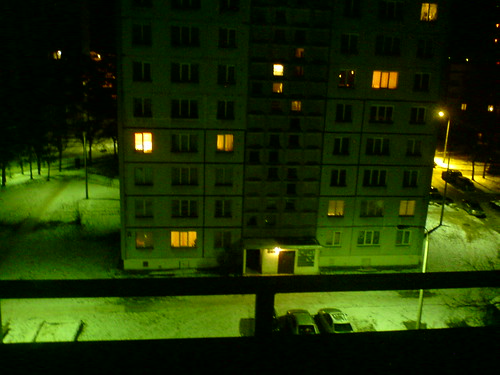 But there are many pictures i realy like
 (mostly macro)
this was an old with macro EM and a little exposure correction...
Forgot! And LED because i wanted it to shine!


[ This Message was edited by: Tomix on 2008-01-05 11:48 ]
[ This Message was edited by: Tomix on 2008-01-05 11:55 ]
[ This Message was edited by: Tomix on 2008-01-05 12:04 ]
--
Posted: 2008-01-05 12:32:07
Edit :
Quote
On 2008-01-05 10:18:33, Milu wrote:
Hi there everyone.
Finally i find cid36 cam module. I'am so happy. Today i have to instal it in my phone.
hehe, i've found CID36 yesterday

(i had 36 but with bad optics, blurred photos on the right side of pictures).
Now i have new module
so im, also v. happy
Now im going to test it outside, sunny day
--
Posted: 2008-01-05 12:51:23
Edit :
Quote
New Topic
Reply
