Esato Mobile
Sony Ericsson / Sony : Symbian phones : m600 icons
> New Topic
> Reply
< Esato Forum Index > Sony Ericsson / Sony > Symbian phones > m600 icons Bookmark topic
Page12345>

flaminglips Posts: 294

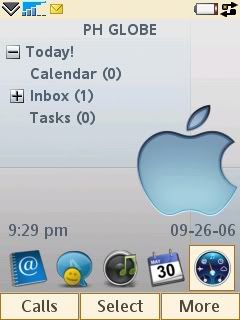
heres the screen shot for my modified icons


icons available here
http://www.uploading.com/files/ND1BBO08/m600_icons.rar.html


[ This Message was edited by: flaminglips on 2006-09-26 16:30 ]
--
Posted: 2006-09-26 15:53:45
Edit : Quote

flaminglips Posts: 294

share yours...
--
Posted: 2006-09-26 15:58:32
Edit : Quote

QuickShare Posts: > 500

that's cool.. can it be done with P990 aswell? sorry i don't have any of these phone.. let me bump this topic for you
--
Posted: 2006-09-26 16:00:27
Edit : Quote

dancingfate Posts: > 500

HOw to do that?
I mean to change that icons...
TIA for your answer.
--
Posted: 2006-09-26 16:04:26
Edit : Quote

flaminglips Posts: 294

1. place the png icon in any folder

2. highlight the icon you want to change

3.from stand by menu press more and choose edit

4. under shortcut icon choose browse

5. search for the icon and save

--
Posted: 2006-09-26 16:26:00
Edit : Quote

Marc_SE Posts: > 500

Nice icons!
--
Posted: 2006-09-26 18:08:03
Edit : Quote

Szadzik Posts: 24

Yeah, that's very nice. I have M00 from Vodafone uk and I don't know how to put the icons onto the main screen. there is the menu screen and today screen, but how to put shortcuts onto today screen?
--
Posted: 2006-09-26 22:19:04
Edit : Quote

osamede Posts: 61

Thanks!
--
Posted: 2006-09-26 22:23:34
Edit : Quote

flaminglips Posts: 294

up...
--
Posted: 2006-09-27 01:44:15
Edit : Quote

flaminglips Posts: 294

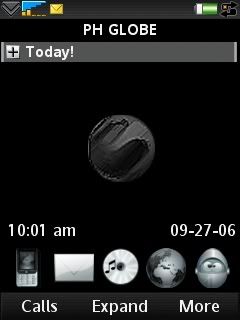
for dark themes

icons available here
http://www.uploading.com/files/NY0MORR9/white_icons.rar.html
--
Posted: 2006-09-27 04:20:08
Edit : Quote
Page12345>

New Topic   Reply
Forum Index

Esato home