Sony Ericsson / Sony : Software, Firmware and Drivers : Turn your K800 into a Walkman Look a Like
>
New Topic
>
Reply<
Esato Forum Index
>
Sony Ericsson / Sony >
Software, Firmware and Drivers
> Turn your K800 into a Walkman Look a Like
Bookmark topic
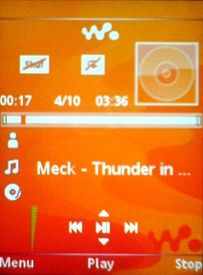
I've created a Walkman menu pack that includes KD Player. KD Player is a walkman look alike JAVA AAC+MP3 player, with album art support. I've replaced the menu item that normally opens the music player so that it opens KD Player instead.
The pack also includes Video Maniac, which plays video better than the K800 player - one joystick movement to rotate between landscape and portrait, FAST ff/rew with on screen progress bar. (these are improvements over the inbuilt movie player). Video Maniac replaces Play Now in the Main Menu.
Opera Mini replaces "Internet Services" in the main menu.
Also, Walkman startup graphics and themes are included.
The Radio is moved out of "Entertainment" and replaces Video Call (Video Call is moved to Entertainment)
To install the menu pack, you need to use XS++ (or FAR+SEFP) to upload the "tpa" folder to your phone - this step will modify your menu, menu icons and startup graphics. Then to make the Walkman, Video Maniac and Opera Mini menu items work, you need to have the java apps installed (they are included in the bundle)
Another little extra in this menu pack is Mini Commander, a File Manager for JAVA that includes file manager, RAR and ZIP management, text editor and image viewer.
You tube demo:
http://www.youtube.com/watch?[....]opid%3D155197%26%23entry155197
Get the pack here
Version 2:
Includes Full Replica Walkman Skin as default in KD Player application:
http://rapidshare.com/files/54853799/K800_Walkman_2.rar.html
Version 1:
http://rapidshare.com/files/51748164/K800_Walkman.rar.html
Instructions for Uploading to phone (and modifying your own menu if you are game)!
http://www.esato.com/board/viewtopic.php?topic=153990#post2086512
_________________
File System Tweaks for the K750
K750 Tricks
K800 Tips and Themes
Max's K800 Page[ This Message was edited by: max_wedge on 2007-09-11 05:39 ]
--
Posted: 2007-08-28 08:08:26
Edit :
Quote
Vide Maniac opens faster if you use the Orange Bubbles.thm Walkman theme included in the pack.
--
Posted: 2007-08-28 08:12:43
Edit :
Quote
@max

here i am again bro.... can i request for the backup of some K810 files..
namely the startup and shutdown screens....
many thanx kimo!
--
Posted: 2007-08-28 08:47:04
Edit :
Quote
^^^ Here are the K810 start up shutdown pics & sound.
http://www.mediafire.com/?0k9g9tyuqtb
--
Posted: 2007-08-28 09:08:09
Edit :
Quote
KD Player album art - put folder.jpg in album folder.
--
Posted: 2007-08-30 04:34:03
Edit :
Quote
thanx chad
--
Posted: 2007-08-30 04:38:10
Edit :
Quote
For some reason videomaniac turns out to look like.. russian? Well the text is in those characters -___-;. Tried finding another version online, and they all have splash screen. Gah, foreign language or splash screen.
I'm using HK K810i R6BC002 CID52 if it matters.
--
Posted: 2007-08-30 04:56:51
Edit :
Quote
doesn't matter. There is a english version, but you don't need it - it's very simple to use:
Video Maniac Commands:
* Down Joystick in portrait mode to change to landscape
* Down joystick in landscape mode (when holding phone horizontal - it's actually left joystick) to convert to portrait mode.
* Right/left joystick to advance or retard tracks
* Right/Left and hold to ff/rew
* right softkey - information
* left softkey - screen capture (saved in current folder)
* back key - exit video or app.
--
Posted: 2007-08-30 05:07:18
Edit :
Quote
Yeah. I know, but I'm anal about these kinds of things, do you happen to have a link to english one where there is no splash screen? If not i'll try to keep googling =)
--
Posted: 2007-08-30 05:40:24
Edit :
Quote
Never mind got it.
--
Posted: 2007-08-30 06:24:57
Edit :
Quote
New Topic
Reply
