Sony Ericsson / Sony : Software, Firmware and Drivers : k790a now says k800i and no network, Do you know what's going on?
>
New Topic
>
Reply<
Esato Forum Index
>
Sony Ericsson / Sony >
Software, Firmware and Drivers
> k790a now says k800i and no network, Do you know what's going on?
Bookmark topic
Hi,
I got a k790a in Mexico a couple of months ago, I'm living in Paris and my phone here is a LG piece of crap that keeps losing the signal, so I went to a shop to get my Sony unlocked so I could use it here and they did unlock it but there's something wrong. Before unlocking, it connected to the Orange network in roaming with the mexican sim card and would not work with the french one, now it works with both cards but cannot connect to any network, the guys at the store are stunned and can't find a solution so they told me to send it for repair, the thing is that I left the papers back in Mexico and it will take a while to get them here.
Everything seems to be working fine but when I display the phone info, it tells me it's a k800i, I'm thinking that when they unlocked it, they installed the k800i firmware. Could this be causing the "no network" problem?
Could you guys please explain to me what I can do to make it work? Is it possible to make it work in both countries without too much hassle? Is it possible to do it on a Mac? (I can get acces to a PC but It would be easier for me on the Mac)
I'm sorry to bother you with this, but I've been reading the forum for a few hours now and cannot find similar topics.
Any help would be greatly appreciated!
Thanks.
Chaka
--
Posted: 2008-03-14 06:08:44
Edit :
Quote
try wotanserver.com($) or XS++ free try
www.4shared.com search "K790 america"
Firmware: R6BC002 CID52 Generic America 2 for K790a not K800
K790i Tri-band EDGE 900/1800/1900 MHz
K790a Tri-band EDGE 850/1800/1900 MHz
K790c Tri-band EDGE 900/1800/1900 MHz
[ This Message was edited by: Brankar on 2008-03-14 08:49 ]
--
Posted: 2008-03-14 09:01:10
Edit :
Quote
Hi,
Thank you for your answer.
I went to 4share and found these similar files:
K790_R1KG001_FS_AMERICA_2_RED52.fbn
K790_R1GB001_FS_AMERICA_2_RED49.fbn
K790_R1KG001_MAIN_GENERIC_RED52.mbn
K790_R1KG001_MAIN_GENERIC_RED52.mbn
K790_R6BC002_MAIN_GENERIC_EV_RED52.mbn
K790_R8BC004_MAIN_GENERIC_EV_RED52.mbn
K790_R8BF003_MAIN_GENERIC_EV_RED52.mbn
Would one of them help? Why are there 2 file types (.mbn .fbn) Could you explain to me what they mean or point me to somewhere I can learn about them?
Thanks again
--
Posted: 2008-03-14 15:05:59
Edit :
Quote
use xs++ to flash for free, it looks like the retards at the phone shop flashed k800i firmware to your phone this should help you choose your firmware
http://www.topsony.com/forum/cmps_index.php?page=info_lenguaje
--
Posted: 2008-03-14 16:10:41
Edit :
Quote
On 2008-03-14 06:08:44, Chaka wrote:
Hi,
I got a k790a in Mexico a couple of months ago, I'm living in Paris and my phone here is a LG piece of crap that keeps losing the signal, so I went to a shop to get my Sony unlocked so I could use it here and they did unlock it but there's something wrong. Before unlocking, it connected to the Orange network in roaming with the mexican sim card and would not work with the french one, now it works with both cards but cannot connect to any network, the guys at the store are stunned and can't find a solution so they told me to send it for repair, the thing is that I left the papers back in Mexico and it will take a while to get them here.
Everything seems to be working fine but when I display the phone info, it tells me it's a k800i, I'm thinking that when they unlocked it, they installed the k800i firmware. Could this be causing the "no network" problem?
Could you guys please explain to me what I can do to make it work? Is it possible to make it work in both countries without too much hassle? Is it possible to do it on a Mac? (I can get acces to a PC but It would be easier for me on the Mac)
I'm sorry to bother you with this, but I've been reading the forum for a few hours now and cannot find similar topics.
Any help would be greatly appreciated!
Thanks.
Chaka
says a loot about the unlock shop you took it to, doesnt it?
anyway, you will need to flash k790 firmware to it via xs++ as number1 suggested.
you can unlock it yourself by getting the simox unlock patch generator and dragging and dropping the main firmware into the patch generator. you will then need to flash the patch along with the main to the phone using setool2lite
--
Posted: 2008-03-14 16:31:30
Edit :
Quote
yeah I suggest flashing the original k790a firmware onto it, dont forget to do all three parts the main (.mbn) the FS (.fs), and customization.
and then you can try unlocking it urself.
--
Posted: 2008-03-14 17:22:44
Edit :
Quote
Thank you for your replies,
I think that it is already unlocked since now I can operate the phone with both sim cards, before when I used the french card it told me something like "wrong card inserted", how can I verify this?
I went to the page Number 1 suggested, it seems that I need files with America 2 in the file name, is it possible to use these 2?
K790_R1KG001_FS_AMERICA_2_RED52.fbn
K790_R8BF003_MAIN_GENERIC_EV_RED52.mbn
I could not find the Firmware: R6BC002 CID52 Generic America 2 for K790a that Brankar suggested, do you know the difference between this and the ones that I found?
I'm learning as fast as I'm typing but, what is customization? is there a specific file type that I should be looking for?
Thanks
--
Posted: 2008-03-14 17:43:28
Edit :
Quote
You can find
K790 R6BC002 MAIN GENERIC EV RED52
K790 R6BC002 FS AMERICA 2 RED52
and
K790 R1JG001 MAIN NAM 1 EV RED52
K790 R1JG001 FS AMERICA 2 RED52
here
--
Posted: 2008-03-14 18:03:21
Edit :
Quote
your gonna have more issues with it I think.
read this. (Iv never got this method to work tho)
http://www.mobile-files.com/forum/showthread.php?t=47887
the "network selection" is in the GDFS. Do you have a backup? if so just flash that backup. If not i would take it back to the shop that ragged the phone.
OR (this one works - iv done it)
try processing this GDFS script with the correct band assignment. (the last 2 digits need to be changed to match the actual bands in your phone) --09 or 0a perhaps, im not reall sure what one. (everything is case sensitive too)... if you do do this MAKE A BACKUP OF THE GDFS FIRST!!!! I cant stress that enough. If something goes wrong then you have a backup. If you dont and it errors out, power goes out, computer freezes or what ever you could be the proud owner of a brick. MAKE A BACKUP!!!!
BTW changing it to something that the phone does not have WILL eventually create problems.
gdfswrite:000000AC12
;00 MS_GSM900
;01 MS_EGSM900
;02 MS_DCS1800
;03 MS_PCS1900
;04 MS_GSM900_DCS1800
;05 MS_EGSM900_DCS1800
;06 MS_GSM900_PCS1900
;07 MS_EGSM900_PCS1900
;08 MS_DCS1800_PCS1900
;09 MS_GSM900_DCS1800_PCS1900
;0a MS_EGSM900_DCS1800_PCS1900
;0b MS_GSM850
;0c MS_GSM850_PCS1900
;0d MS_EGSM900_GSM850
;0e MS_DCS1800_GSM850
;0f MS_EGSM900_DCS1800_GSM850
;10 MS_EGSM900_GSM850_PCS1900
;11 MS_DCS1800_GSM850_PCS1900
;12 MS_EGSM900_DCS1800_GSM850_PCS1900
[ This Message was edited by: mattsw810i on 2008-03-14 19:06 ]
[ This Message was edited by: mattsw810i on 2008-03-14 19:07 ]
[ This Message was edited by: mattsw810i on 2008-03-14 19:10 ]
--
Posted: 2008-03-14 20:03:57
Edit :
Quote
oh snap wait. I thought you had a k800
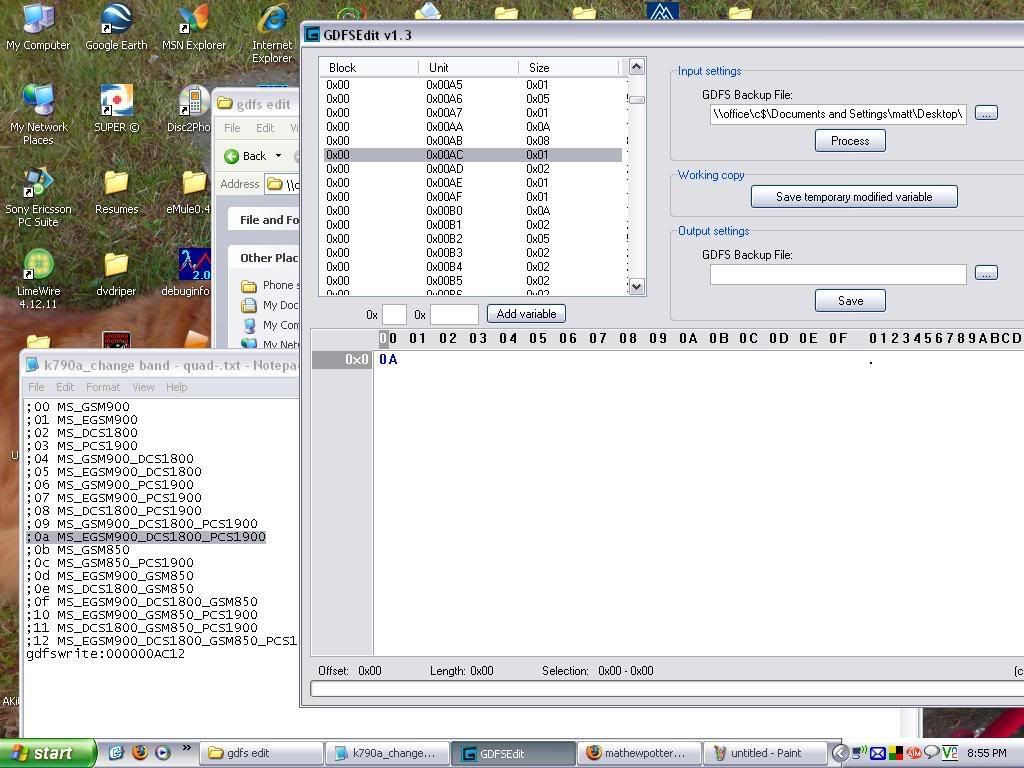
run this script it WILL fix it - and I know this one isnt on the list (cap A)
gdfswrite:000000AC0A
a screen shot 4 ya (click to make it big)
this is that section in a stock K790a GDFS (shows 0A)
[ This Message was edited by: mattsw810i on 2008-03-14 19:15 ]
--
Posted: 2008-03-14 20:13:27
Edit :
Quote
New Topic
Reply
