>
New Topic
>
Reply<
Esato Forum Index
>
Sony Ericsson / Sony >
Software, Firmware and Drivers
> Album Art in Walkman 3.0
Bookmark topic
Hello ^^
Please help me to understand. What picture size should have album art, to be normally displayed in Walkman player?
Cause in my w910 and album art picture is twice smaller...
--
Posted: 2008-06-11 08:34:42
Edit :
Quote
i have the same problem, use mp3tag to change the albumart AFTER transferring songs using mediamanager, make sure its in jpeg nd not png as itunes uses png. but i think larger album art makes browsing media player slower though:(
ps normally its the file size that matters more, my album art is 500*480 but if its over 120kb in size it wont show....use microsoft picture manager to compress.
hope this helps:)
--
Posted: 2008-06-11 08:41:13
Edit :
Quote
Thnx I'll try this kind of operations )) to get a little album art picture in my phone....
I think SE should include instructions about this kind of stuff. . . . .
[ This Message was edited by: VladimirOK on 2008-06-12 11:50 ]
--
Posted: 2008-06-12 12:49:59
Edit :
Quote
i used to have the album art @ 300x300. it was with

2.0 though
_________________
1-36-004459-2||i

jay0726||i
missing clara

||
most helpful member, according masseur[ This Message was edited by: tranced on 2008-06-12 12:11 ]
--
Posted: 2008-06-12 13:02:48
Edit :
Quote
On 2008-06-12 13:02:48, tranced wrote:
i used to have the album art @ 300x300. it was with
2.0 though
Interesting how picture was showed in your player?
Cause i hate when picture is very small in that Icon..... where its displaying.
--
Posted: 2008-06-12 14:31:03
Edit :
Quote
On 2008-06-12 14:31:03, VladimirOK wrote:
Interesting how picture was showed in your player?
Cause i hate when picture is very small in that Icon..... where its displaying.
just like this:

--
Posted: 2008-06-12 14:59:44
Edit :
Quote
Well i see no difference in Album Art picture size in both walkmans....
So i guess i need to try 300x300 ? Your album art displayed correctly?
I mean .... size of the album art is equal to size of the square box?
[ This Message was edited by: VladimirOK on 2008-06-12 15:02 ]
--
Posted: 2008-06-12 16:01:25
Edit :
Quote
yes, mate.
here's a pic of the
3.0 running on a p1:
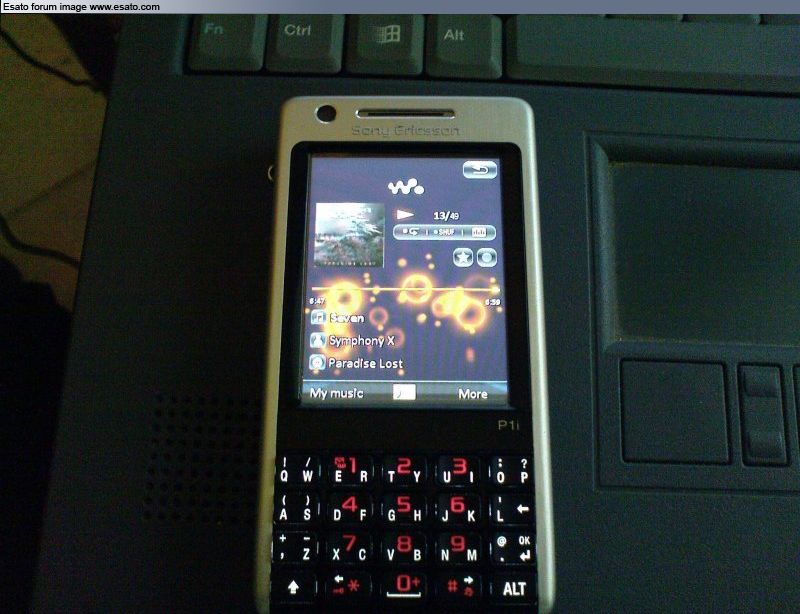
i guess it aint bigger than 300 x 300
--
Posted: 2008-06-12 16:11:23
Edit :
Quote
Anybody is using media manager to insert album art?

Yup seems so... Also someone told me that size of picture not effect on album art size in Walkman.
Its too complicated. . . .^^
I hate those album arts )) Maybe i just need not to use them ? ))
I think this will solve the problem
P1i Nice phone btw.
[ This Message was edited by: VladimirOK on 2008-06-12 15:25 ]
--
Posted: 2008-06-12 16:20:16
Edit :
Quote
watch
this thread. it's about a symbian phone, but it could help too.
--
Posted: 2008-06-12 16:22:50
Edit :
Quote
New Topic
Reply
