>
New Topic
>
Reply<
Esato Forum Index
>
Sony Ericsson / Sony >
General
> Capital Æ, Ð and Þ in P800
Bookmark topic
I've been using the P800 for 2 weeks now and I'm getting to know it pretty well.
I'm starting to know my way around it and my skills in handwriting are improving. However, I haven't been able to write the capital letters Æ, Ð and Þ, or Æ, eth and thorn.
I'm able to write the lower case versions of these charachters but I'm unable to write the upper case.
I've tryed everything I can think of. Writing the letters in capital form on the P800 display gives me the same result as the lower case version, a lower case charachter.
I guess nobody knows the thorn and eth, but Norwegians might know Æ, I noticed Laffen was teaching a friend how to write it in his picture galore.
Does anyone know anything about this?
--
Posted: 2003-01-07 02:08:00
Edit :
Quote
no
--
Posted: 2003-01-07 02:12:00
Edit :
Quote

Just got mine 2 days ago!
For extended characters, please refer to the HELP file built into the P800 itself, look under HANDWRITING RECOGNITION. All the characters you were looking for are listed there.
Can I just say that writing accented letters is a breeze?!?!?! Ü
[ This Message was edited by: jplacson on 2003-01-07 03:21 ]
--
Posted: 2003-01-07 04:17:00
Edit :
Quote
I have been trough the manual as well as the Handwriting recognicion part of the Help in the phone. I find it very very annoying to have this part there only... and beeing unable to print it.
I have followed the directions in the Help file many times, but I cannot get the capital letters. All I get are the lower case letters.
I just needed a proof that this si something in the phone... not my stupidity.
The handwriting in the P800 is a breeze... except for writing i. It really annoyes me to have to put a dot on top of the i because it isn't fool proof enough.
--
Posted: 2003-01-07 12:20:00
Edit :
Quote
hey you and your icelandic character again

I just try Æ, Ð and Þ, have managed to write Æ and Þ, but no luck on Ð.
Make sure you have the line bottom up before writing extended characters. (and write on the upper part of the screen)
/floAt
--
Posted: 2003-01-07 12:46:00
Edit :
Quote
There you go Merkur
BTW You don't have to write a dot on top of the i. Just draw a straight line down and then up.
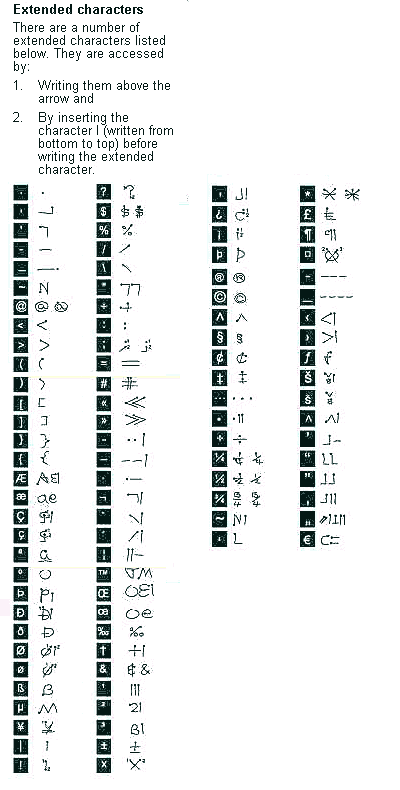
[ This Message was edited by: laffen on 2003-01-07 12:44 ]
--
Posted: 2003-01-07 13:39:00
Edit :
Quote
Laffen, you are a genious!
Thank you for extracting the helpfile! I wonder how you did this.
But, it does not matter how I write these letters, I don't seem to be able to get the capital letters to come out. All I get is the lower case.
I can't be this thick headed.... I've been using Palm, Pocket PC, R380 (wich didn't have these charachters to my knowledge) and the Motorola Accompli 008 and handwriting has been like a breeze.
--
Posted: 2003-01-08 10:02:00
Edit :
Quote
Finally I managed to do this!
I think the directions for the text input should be made a little bit more clear on this issue.
To get a special letter to be capitalized you need to write an I behind the letter. The only problem I have with this layout is the fact that this is not following the main rule of text input on the device.... And in fact pretty many strokes for just one charachter.
In Palm for example Æ is written like E from bottoms up. For me, with a native language that uses 2 unique charachters plus accented ones and Æ and Ö, I think this slows the text input down.
Thanks guys for helping on the matter! I have managed to write allt the charachters in upper case now, including Ð.
[ This Message was edited by: merkur on 2003-01-08 10:30 ]
--
Posted: 2003-01-08 10:10:00
Edit :
Quote
New Topic
Reply
