Sony Ericsson / Sony : Software, Firmware and Drivers : How do you remove the Demo Tour option on the Entertainment menu in K800i?
>
New Topic
>
Reply<
Esato Forum Index
>
Sony Ericsson / Sony >
Software, Firmware and Drivers
> How do you remove the Demo Tour option on the Entertainment menu in K800i?
Bookmark topic
dennevhyn_31 Posts: > 500
I have a Sony Ericsson K800i and I deleted the Demo Tour video. Right now the Demo Tour option under Entertainment is grayed out. I want to delete it but I don't know how. I don't know how to modify the menu.ml. Is there anyone here who can help me? Thanks in advance.
--
Posted: 2008-10-19 09:27:32
Edit :
Quote
here try this:
http://yea-g.site50.net/My%20docs/tpa.rar
--
Posted: 2008-10-19 10:21:55
Edit :
Quote
hello.
first of all, edit your menu.ml using notepad (notepad ++ is recommended)..
then look for these highlighted lines:
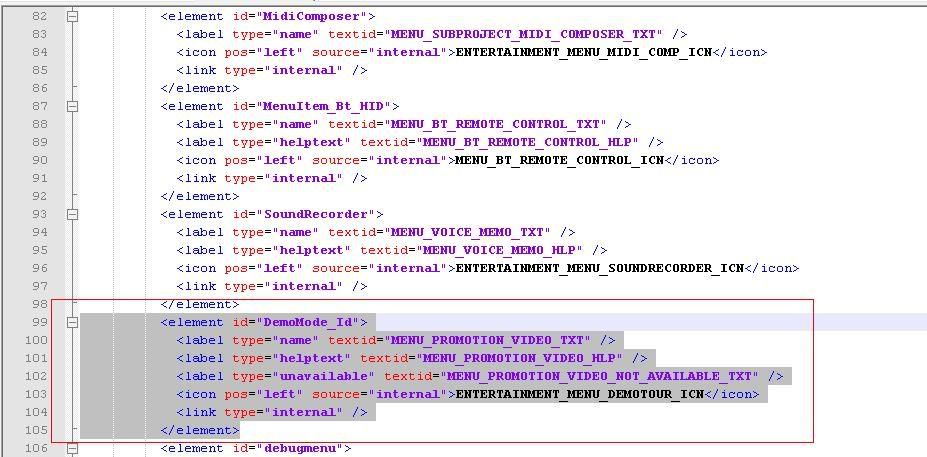
then delete those highlighted lines!
after saving your edited menu.ml, upload using XS++ 3.1
the demo will never show in your menu again

[ This Message was edited by: mundix on 2008-10-19 09:50 ]
--
Posted: 2008-10-19 10:40:58
Edit :
Quote
but you can still have the video

--
Posted: 2008-10-19 11:43:48
Edit :
Quote
dennevhyn_31 Posts: > 500
@mundix: Thank you but How do you save the menu.ml file on to the computer using xs++? Where can i download notepad++?
--
Posted: 2008-10-19 12:07:00
Edit :
Quote
http://www.esato.com/board/viewtopic.php?topic=153990
--
Posted: 2008-10-19 13:32:16
Edit :
Quote
You can save files from your phone using XS++, you can use Far Manager with JDFlasher installed to copy files from your phone.
Notepad is just one right click away from your pc desktop, choose new and text document...
--
Posted: 2008-10-22 11:19:15
Edit :
Quote
New Topic
Reply
